Polycarbonate 3D printing requires a compatible printer, dry filament and grade-specific process validation before approving functional parts.
¿Qué es el filamento de policarbonato (PC)?
La impresión 3D con filamento de PC es el siguiente paso cuando el PLA, el PETG y el ABS ya no cumplen tus requisitos de resistencia o resistencia al calor. El filamento de policarbonato (PC) es uno de los termoplásticos más resistentes y con mayor resistencia al impacto disponibles para la impresión 3D de sobremesa. Si alguna vez has trabajado con ABS o PETG y has deseado una mayor resistencia mecánica, una mayor resistencia al calor o una mejor transparencia, el PC es el siguiente paso lógico.
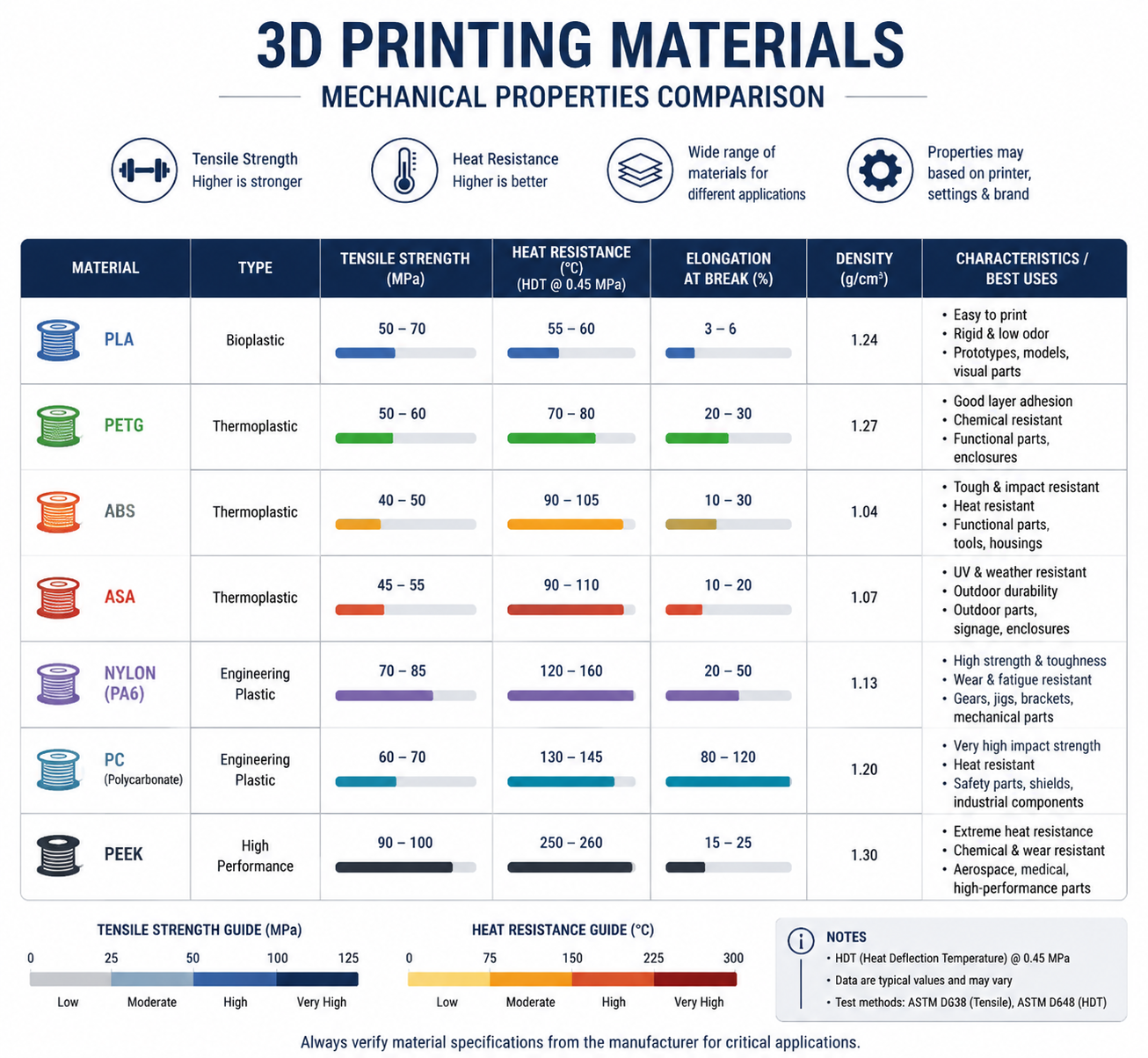
El filamento de PC sirve de puente entre los materiales de uso doméstico, como el PLA y el PETG, y los plásticos técnicos de uso industrial, como el PEEK y el PEI. Ofrece una combinación única de propiedades: resistencia extrema al impacto (hasta 200 veces superior a la del vidrio), alta resistencia a la tracción (55-75 MPa), una temperatura de transición vítrea en torno a los 147 °C y una transparencia natural que pocos otros filamentos imprimibles pueden igualar. Si estás valorando dar el siguiente paso en cuanto a resistencia térmica, nuestro Guía de filamentos de PEEK y la comparación de los Las mejores impresoras 3D para materiales de ingeniería ayuda a definir dónde termina el ámbito de los ordenadores personales y dónde empiezan los verdaderos sistemas de alta temperatura.
Si tu problema más urgente es ajustar con precisión la boquilla, la cama y la ventana de la cámara, utiliza nuestra guía independiente Guía de temperaturas de impresión en PC junto con esta visión general más amplia del material.
Para los equipos de compras y los ingenieros de producto, la decisión clave es si se necesita un ordenador personal puro o uno que facilite el procesamiento Mezcla de PC-ABS, o un grado relleno como el PC-CF. La elección adecuada depende de la resistencia al calor, los objetivos de resistencia al impacto, la capacidad de moldeo y el riesgo de deformación aceptable. Si tu tarea inmediata es ajustar la ventana de proceso, pasa directamente a nuestra Guía de temperaturas de impresión en PC para obtener una respuesta más rápida centrada en la configuración.
En Nylon Plastic, suministramos filamento de PC de grado técnico, además de nuestra amplia gama de nailon y materiales de alto rendimiento, lo que ayuda a los fabricantes y a los aficionados avanzados a superar los límites de lo que se puede conseguir con la impresión 3D de sobremesa.
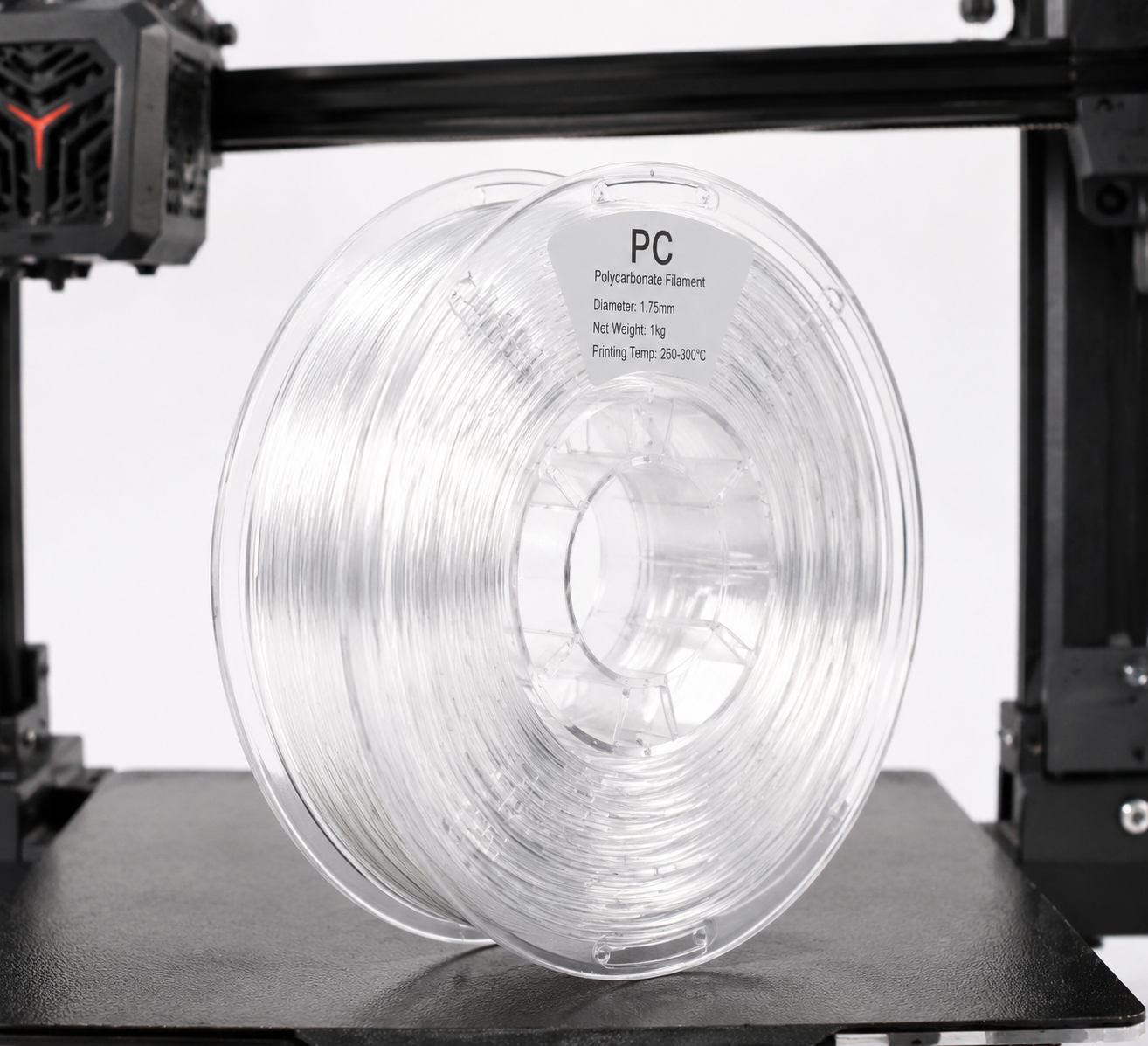
Resumen de las propiedades del filamento de PC
| Propiedad | Policarbonato (PC) | ABS (a título informativo) | PETG (a título informativo) |
|---|---|---|---|
| Resistencia a la tracción | 55–75 MPa | 35-45 MPa | 45–55 MPa |
| Módulo de flexión | 2.200–2.500 MPa | 1.700–2.100 MPa | 1.500–2.000 MPa |
| Resistencia al impacto (Izod) | 600–900 J/m | 150-300 J/m | 70-100 J/m |
| Temperatura de transición vítrea (Tg) | 147 °C | 105°C | 80°C |
| Temperatura de deflexión térmica (HDT a 0,45 MPa) | 130–140 °C | 90–100 °C | 68–70 °C |
| Densidad | 1,20 g/cm³ | 1,04 g/cm³ | 1,27 g/cm³ |
| Claridad óptica | Transparente (natural) | Opaco | De translúcido a transparente |
| Resistencia a los rayos UV | Moderado (añadir estabilizador UV) | De mala calidad (se amarillea rápidamente) | Bien |
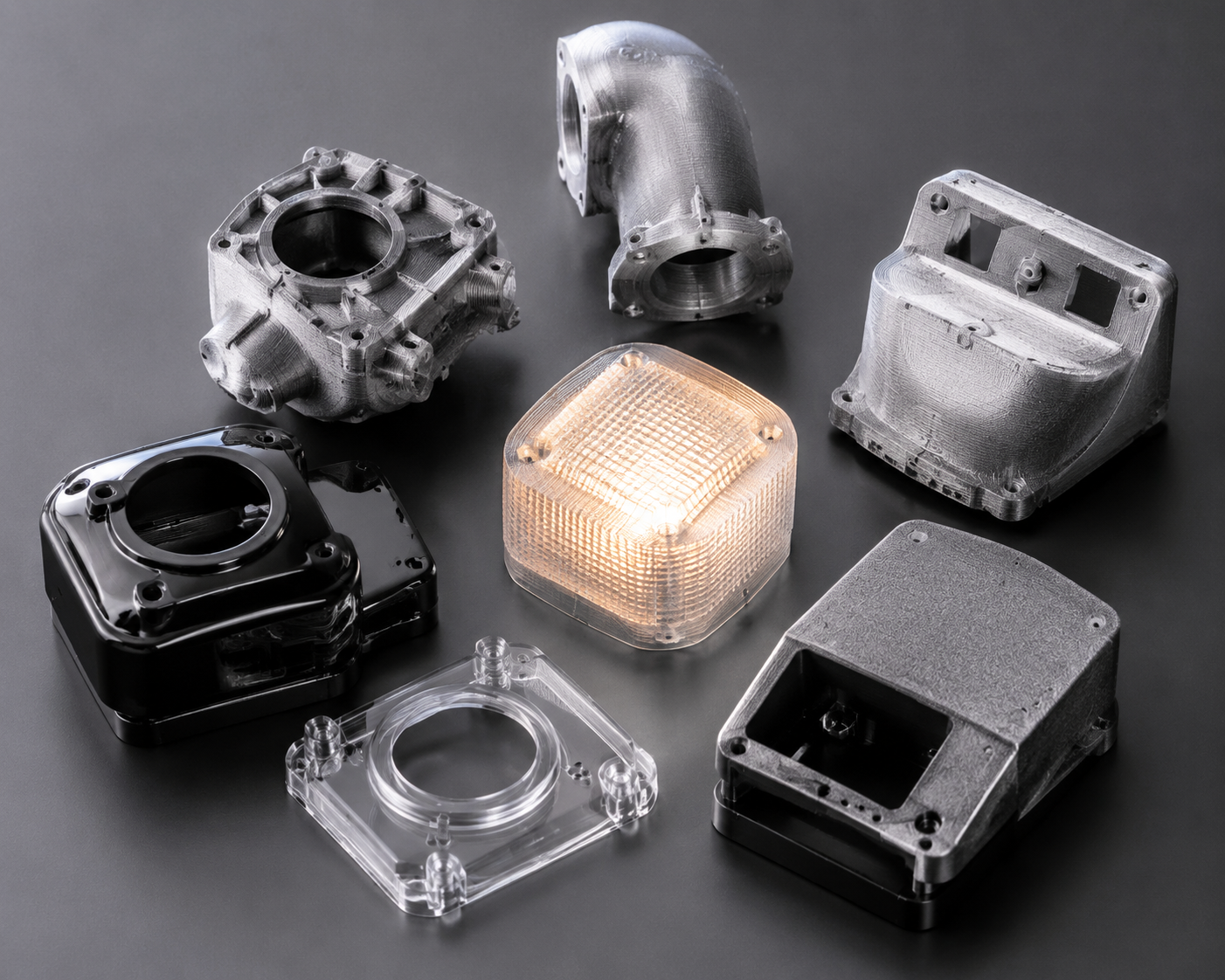
Lo que distingue al filamento de PC es su resistencia al impacto. Con una resistencia al impacto Izod de entre 600 y 900 J/m, absorbe los golpes y las cargas repentinas mucho mejor que el PLA, el PETG o incluso el ABS. Por eso el policarbonato es el material de referencia para gafas de seguridad, cristales antibalas y cajas eléctricas, y por eso resulta ideal para fabricar piezas funcionales impresas en 3D.
Especificaciones necesarias de la impresora para el filamento para PC
No todas las impresoras 3D pueden imprimir con filamento de PC. Antes de comprar una bobina, asegúrate de que tu equipo cumple estos requisitos mínimos:
Temperatura del hotend: 260–310 °C
El filamento de PC se imprime a una temperatura de entre 260 y 310 °C, dependiendo de la marca y la formulación específica. Esto significa que tu hotend debe tener un «heat break» totalmente metálico, ya que los hotends revestidos de PTFE se degradan rápidamente por encima de los 240 °C y desprenden humos tóxicos. Si tu impresora tiene un hotend revestido de PTFE de serie (algo habitual en máquinas básicas como la Ender 3), tendrás que cambiarlo por un hotend totalmente metálico antes de imprimir con PC.
Cama calefactada: 90–120 °C
Una cama calefactada capaz de mantener una temperatura de entre 90 y 120 °C es esencial para garantizar la adherencia del PC y evitar que se deforme. Muchas impresoras económicas alcanzan como máximo los 100 °C en la cama, lo que puede ser suficiente para impresiones de PC más pequeñas, pero puede resultar insuficiente para piezas más grandes. Se recomienda encarecidamente utilizar una cámara de impresión cerrada para mantener la temperatura ambiente y reducir la deformación.
Recinto: Muy recomendable
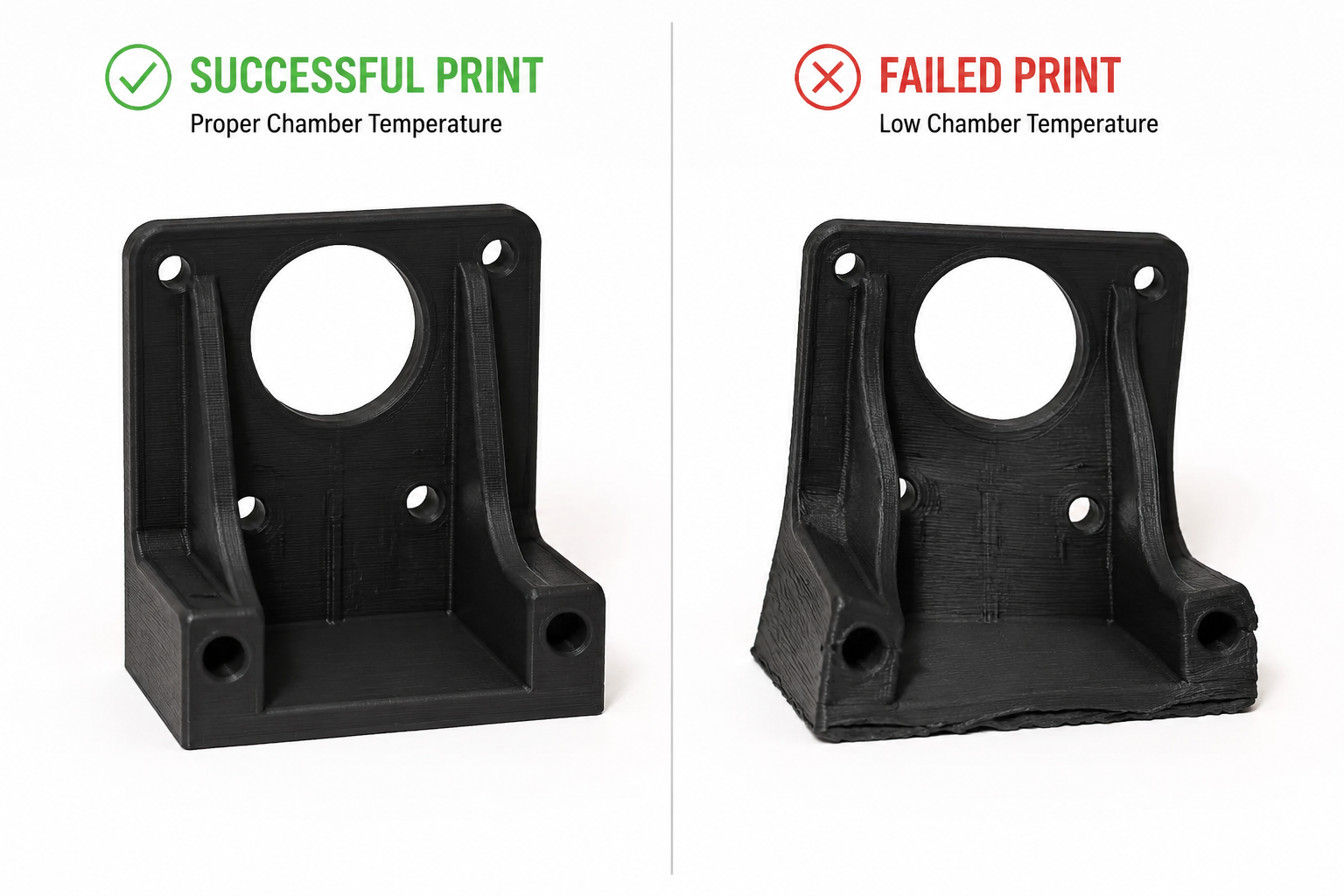
El filamento para impresoras 3D se deforma mucho si no se dispone de un entorno térmico constante. Una cabina mantiene estable la temperatura ambiente y evita que las corrientes de aire provoquen la delaminación de las capas. Si tu impresora no dispone de una carcasa integrada, una carcasa casera (una caja de cartón, una tienda fotográfica o una carcasa para la mesa Lack de IKEA) puede servir en caso de apuro, pero intenta mantener una temperatura ambiente de al menos 45–60 °C en el interior de la cámara. Si el levantamiento de las esquinas y la tensión por contracción son problemas recurrentes, nuestro Guía sobre la deformación en la impresión 3D profundiza en la estrategia de gestión térmica.
Build Surface: PEI, Garolite, or PC-Specific Adhesive
PC sticks well to PEI-coated spring steel sheets at 100–110°C. Garolite (G10/FR4) is another excellent surface — apply a thin layer of PVA glue stick as a release agent. Glass with glue stick also works but has a higher failure rate on large parts. Avoid printing PC directly on bare glass or BuildTak-style surfaces, as the strong adhesion can damage both the part and the bed during removal.
Nozzle Material: Hardened Steel Recommended
Pure PC filament is not abrasive, so a standard brass nozzle works fine. However, many PC blends — particularly PC-CF (carbon fiber filled) and PC-GF (glass fiber filled) — are highly abrasive. If you plan to print filled PC variants, upgrade to a hardened steel or ruby-tipped nozzle.
| Requisito | Minimum | Recomendado |
|---|---|---|
| Hotend Temperature | 260 °C | 280–300°C |
| Temperatura de la cama | 90°C | 100–110°C |
| Hotend Type | Totalmente metálico | All-metal + hardened nozzle |
| Enclosure | DIY enclosure (cardboard box) | Heated enclosure (45–60°C) |
| Build Surface | PEI + glue stick | Garolite (G10) with PVA |
PC Filament Print Settings: A Practical Guide
Nozzle Temperature: Start at 270°C
Most PC filaments print well between 260°C and 310°C. Start at 270°C for your first test print and print a temperature tower to dial in the optimal setting for your specific filament brand. Higher temperatures improve layer adhesion but increase oozing and stringing; lower temperatures reduce stringing but risk poor interlayer bonding.
Signs of temperature too low: poor layer adhesion, delamination during printing, or matte/dull surface finish. Signs of temperature too high: excessive stringing, bubbling, yellowing/burning, or carbonized nozzle buildup.
Bed Temperature: 100–110°C
Set the bed to 100°C for the first layer, then reduce to 90–100°C for the remainder of the print. For large parts (over 150mm in any dimension), maintain 110°C throughout the print to maximize adhesion and reduce warping.
Print Speed: Slow Down
PC filament prints best at slower speeds: 30–50 mm/s for perimeters and 40–60 mm/s for infill. The first layer should be even slower — 20–25 mm/s with no cooling fan. Unlike PLA, which benefits from aggressive part cooling, PC needs time for each layer to fuse properly with the layer below.
Cooling Fan: Off or Very Low
Turn the part cooling fan off for the first 3–5 layers, then run it at a maximum of 20–30% only if needed for bridging and overhangs. Excessive cooling is the number one cause of warping and layer delamination with PC — think of it like printing ABS but with even less cooling tolerance.
Retraction Settings
PC is less prone to stringing than PETG, but it still benefits from proper retraction. For direct-drive extruders: 1–2mm retraction distance at 30–40 mm/s. For Bowden setups: 4–6mm retraction distance at 40–50 mm/s. If you see stringing, increase retraction distance before adjusting temperature.
Drying: Absolutely Essential
PC filament is moderately hygroscopic — it absorbs moisture from the air, and wet PC prints terribly. Bubbles, popping sounds from the nozzle, poor layer adhesion, and a rough surface finish all point to wet filament. Dry PC filament at 80–100°C for 4–6 hours before printing, and store it in a sealed container with desiccant. Print directly from a filament dryer if possible. Our Guía para el secado del nailon is also a useful reference here because the same sealed-storage discipline applies to other hygroscopic engineering filaments.
| Configuración | Starting Value | Notas |
|---|---|---|
| Temperatura de la boquilla | 270°C | Print a temperature tower to fine-tune |
| Temperatura de la cama | 100°C (first layer: 110°C) | Maintain 110°C for large parts |
| Velocidad de impresión | 40 mm/s | First layer at 25 mm/s |
| Cooling Fan | 0–20% | Off for first 3–5 layers; minimal thereafter |
| Retraction (Direct Drive) | 1.5mm @ 35 mm/s | Bowden: 5mm @ 45 mm/s |
| Secado | entre 80 y 100 °C durante 4 a 6 horas | Store in sealed container with desiccant |
Common PC Filament Problems and Solutions
Warping and Lifting
Causa: Insufficient bed adhesion or ambient temperature fluctuations. PC has a relatively high coefficient of thermal expansion, meaning it shrinks significantly as it cools.
Solution: Increase bed temperature to 110°C, use an enclosure, add a 10mm brim, and apply a thin layer of PVA glue stick on the build plate. For stubborn warping on large parts, use a draft shield (available as a slicer setting in most slicers) to contain heat around the print.
Layer Delamination (Splitting Between Layers)
Causa: Printing temperature too low or cooling fan running too aggressively. The layers cool before properly fusing with the previous layer.
Solution: Increase nozzle temperature by 5–10°C, turn off part cooling completely, reduce print speed by 10–15 mm/s, and ensure the enclosure is maintaining stable ambient temperature.
Moisture-Related Defects (Bubbles, Popping, Rough Surface)
Causa: Wet filament. PC absorbs moisture from ambient air within 24–48 hours of exposure.
Solution: Dry filament at 80–100°C for 4–6 hours. Print directly from a filament dryer running at 70°C. Store unused filament in a vacuum-sealed bag with fresh desiccant.
Stringing and Oozing
Causa: Temperature too high, retraction insufficient, or wet filament.
Solution: Lower nozzle temperature by 5°C increments, increase retraction distance by 0.5mm, and ensure filament is properly dried. PC is less stringy than PETG but still needs tuning.
PC Filament Variants: PC-ABS, PC-CF, PC-GF, and More
Pure PC filament is excellent, but several PC-based blends expand its capabilities:
PC-ABS Blend
PC-ABS blends combine polycarbonate’s heat resistance and impact strength with ABS’s improved printability and lower cost. Typical printing temperature: 250–270°C, bed: 100–110°C. PC-ABS is easier to print than pure PC (less warping) while retaining most of the mechanical benefits. Common applications include automotive interior parts and consumer electronics housings.
PC-CF (Carbon Fiber Filled)
Adding 10–20% carbon fiber to PC dramatically increases stiffness (flexural modulus can exceed 6,000 MPa) and reduces warping by lowering the coefficient of thermal expansion. Trade-offs: the filament becomes brittle (lower impact strength), highly abrasive (requires hardened nozzle), and loses transparency (becomes black/matte). PC-CF is ideal for structural brackets, drone frames, and jigs and fixtures where stiffness matters more than impact resistance.
PC-GF (Glass Fiber Filled)
Glass fiber-filled PC offers stiffness improvements similar to PC-CF but at a lower cost and with better impact resistance retention. PC-GF is also abrasive, so a hardened nozzle is required. It is commonly used for industrial tooling, functional prototypes, and parts requiring dimensional stability at elevated temperatures.
PC-PBT and PC-PET Blends
Less common but notable: PC-PBT blends offer improved chemical resistance over pure PC, while PC-PET blends combine PC’s strength with PET’s ease of printing. These are specialty materials for specific applications like chemical-resistant enclosures and food-contact components (subject to FDA compliance verification).
| Variante | Ventajas clave | Compensación | Boquilla |
|---|---|---|---|
| Pure PC | Transparency, impact resistance | Warping, high temp required | Brass OK |
| PC-ABS | Easier to print, lower cost | Slightly lower heat resistance | Brass OK |
| PC-CF | Extreme stiffness, low warping | Brittle, abrasive, opaque | Hardened steel required |
| PC-GF | Good stiffness, lower cost | Abrasive, opaque | Hardened steel required |
| PC-PBT | Resistencia química | Less common, harder to source | Brass OK |
PC vs Other High-Temperature Filaments: When Does PC Win?
PC filament sits in a sweet spot between mid-range materials (ABS, PETG) and ultra-premium filaments (PEEK, PEI). Here is how it compares:
| Material | Print Temp | Tg / HDT | Precio por kg | Lo mejor para |
|---|---|---|---|---|
| PC | 260–310°C | 147°C / 138°C | $35–60 | Impact-resistant functional parts, transparent prototypes |
| ABS | 230–260°C | 105°C / 98°C | $15–25 | Budget enclosures, general prototyping |
| ASA | 240–260 °C | 105°C / 95°C | $25–40 | Outdoor parts needing UV resistance |
| Nailon (PA6) | 250–280°C | 50–60°C / 160°C | $30–50 | Wear parts, gears, flexible components |
| PEI (Ultem) | 350–390°C | 217°C / 200°C | $150–250 | Aerospace, medical, extreme environments |
| PEEK | 360–410°C | 143°C / 250°C+ | $400–800 | Highest-performance applications |
Choose PC when: you need impact resistance that ABS cannot deliver, transparency that nylon cannot provide, or heat resistance that PETG cannot handle — y your printer can maintain the required temperatures with an enclosure.
Skip PC when: your printer lacks an all-metal hotend and enclosure, you need maximum chemical resistance (use nylon or PEI), or you are printing flexible parts (use TPU or nylon instead).
Best PC Filament Brands in 2026
Several manufacturers produce reliable PC filament. Based on community testing and practical experience:
- Prusament PC Blend — Prusa’s in-house PC blend prints at 260–280°C with excellent consistency and is among the easiest PC filaments to print on properly equipped machines.
- Polymaker PolyMax PC — Known for exceptional layer adhesion and impact resistance; prints at 250–270°C with good bed adhesion on PEI.
- 3DXTech PC — Industrial-grade PC and PC blends (PC-CF, PC-GF) made in the USA with tight diameter tolerances; typically requires 280–310°C.
- eSUN ePC — A more affordable option that prints at 250–270°C, suitable for users transitioning from ABS/PETG to PC. Slightly lower heat resistance than premium brands.
- Bambu Lab PC — Optimized for Bambu Lab enclosed printers with RFID spool recognition; prints reliably at 270–290°C.
When sourcing PC filament, prioritize consistent diameter (within ±0.03mm), proper vacuum-sealed packaging with desiccant, and a manufacturer that provides a detailed technical datasheet (TDS) with mechanical property data.
Safety Considerations When Printing PC Filament
PC filament printing produces fumes that, while less immediately toxic than ABS fumes, still warrant ventilation. Key safety practices:
- Print in a well-ventilated area or use an enclosure with a fume extraction system (HEPA + activated carbon filter).
- Avoid extended exposure to printing fumes in unventilated rooms — bisphenol A (BPA) is a component of polycarbonate, and while the risk from FDM printing is low compared to industrial processing, precaution is warranted.
- Do not burn or overheat PC filament beyond recommended temperatures — thermal decomposition starts around 350°C and produces potentially harmful compounds.
- Wear heat-resistant gloves when handling PC prints fresh off the bed — the bed operates at 100°C+ and the part itself can cause burns.
Conclusion: Is PC Filament Right for Your 3D Printing Projects?
PC filament is not for beginners. It demands an all-metal hotend, a heated bed capable of 100°C+, an enclosure, and careful attention to print settings and filament drying. But for users who can meet these requirements, PC delivers a combination of impact strength, heat resistance, and optical clarity that no other sub-$100/kg filament can match.
For professional applications — functional prototypes, jigs and fixtures, electrical enclosures, automotive under-hood components, and transparent mechanical parts — PC filament is often the best material available on a desktop printer short of PEEK or PEI.
At Nylon Plastic, we supply engineering-grade PC filament alongside our full range of nylon (PA6, PA66, PA12), carbon fiber-filled, and glass fiber-filled materials for demanding 3D printing, CNC machining, and injection molding applications. If you need technical guidance on material selection or want to discuss your specific application requirements, our engineering team is available to help.
Special Techniques
Annealing PC Prints
Post-print heat treatment improves properties:
1. Place print in oven at 120°C
2. Hold for 30-60 minutes
3. Cool slowly in oven
4. Expect slight dimensional change
Bonding PC Parts
- Solvent welding: Methylene chloride (effective but toxic)
- Epoxy: Works well for most applications
- Friction welding: Creates strong bonds